From Custavia · Remote input

Remotype Your phone is the keyboard now
Type and point from anywhere in the room.
Remotype turns the phone in your pocket into a real wireless keyboard and trackpad — with nothing to install on the computer. Search from the sofa, type a URL across the room, drive a terminal from your palm. Swipe typing, real shortcuts, real travel.
In beta, rolling out through the stores now. Write to us for early access — one email when it's live, nothing else.
How it works
Two phones, two superpowers.
The same app, tuned to what each platform does best — and either way, your keystrokes go from your phone to your computer and nowhere else.
A real Bluetooth keyboard — or more.
Your phone connects as genuine Bluetooth HID — the computer sees an ordinary keyboard and mouse. No app, no driver, no server. Works with Windows PCs, Macs, iPads, Linux, smart TVs, even locked-down work machines.
Or pair over Wi-Fi with Remotype Host to unlock the full studio — mirror your computer's screen to your hand, hear its audio, sync the clipboard, jump between computers.
Bluetooth anywhere · Wi-Fi for everythingWi-Fi, with a featherweight companion.
iPhones can't impersonate Bluetooth keyboards — Apple's rules. So Remotype pairs over your own Wi-Fi with Remotype Host, a free, tiny companion for Mac, Windows and Linux. Keyboard, trackpad, screen mirror, audio — discovered automatically on your network.
Open the host, tap your computer's name on the phone, type.
Local network only · no cloudWhat it does
A precision tool, not a remote-app toy.
Machined keycaps with real travel, built to be used while your eyes are on the other screen.
Swipe typing, for your computer
Glide-type with the keyboard you already use — Gboard, QuickPath, any IME — and the words land on the computer. One thumb, 50–60 wpm.
Real keyboard shortcuts
Hold a modifier and tap for chords — Ctrl+C, Alt+Tab, Cmd+Space — or quick-tap to arm it for just the next key. A ring shows what's armed.
Multi-touch trackpad
Move, tap to click, two-finger scroll, two-finger right-click, pinch to zoom, hold to drag-select. Resizable pad, adjustable speed.
The full layout
Esc, Tab, arrows, Home/End, F1–F12 in a collapsible drawer, and media keys — volume, brightness, play/pause — all first-class.
See your computer's screen
Mirror a live, magnified slice of your Mac or PC to your hand — it follows your cursor or the text you're typing. Go fullscreen and steer without looking up.
Hear it, too
Stream your computer's audio straight to the phone — watch from across the room with sound, or listen audio-only with the screen off.
Cast to the big screen
Send your computer's screen straight to a Chromecast or Google TV — picture and sound, no cables, driven from the phone in your hand.
A remote for your TV
Turn the phone into a remote for an Android or Google TV — D-pad, power, volume and a real keyboard for the search box. On Android, nothing to install on the TV.
Present like you mean it
A laser dot, a spotlight that dims the room, freehand ink — rendered live on the screen for the whole audience. Slide controls and a timer sit in your hand.
A studio in your pocket
Dictate to the desktop, type stored passwords behind Face ID, fire macros, tap out a numpad, point with a gyro air-mouse, sync the clipboard, glance at CPU and now-playing — a deck of modes, one swipe apart.
Works where nothing else does
TV-connected PCs, presentation rigs, locked-down work machines that forbid installs — if it accepts a Bluetooth keyboard, it accepts you.
A connection that survives
On Android a quiet foreground service keeps the link alive through screen-off and app-switching, and reconnects to your last computer.
Made to be looked past
The MILLED interface: machined keycaps that press with real travel and instant feedback — designed for eyes-on-the-other-screen use.
Accessible, properly
Large text, screen readers, reduced motion — supported on both platforms, to the same standard as everything else we ship.
Collects no data. None.
No analytics, no accounts, no ads, no cloud. Keystrokes go from your phone to your computer and nowhere else — ever.
A quick look
Machined for the hand. Built for the room.
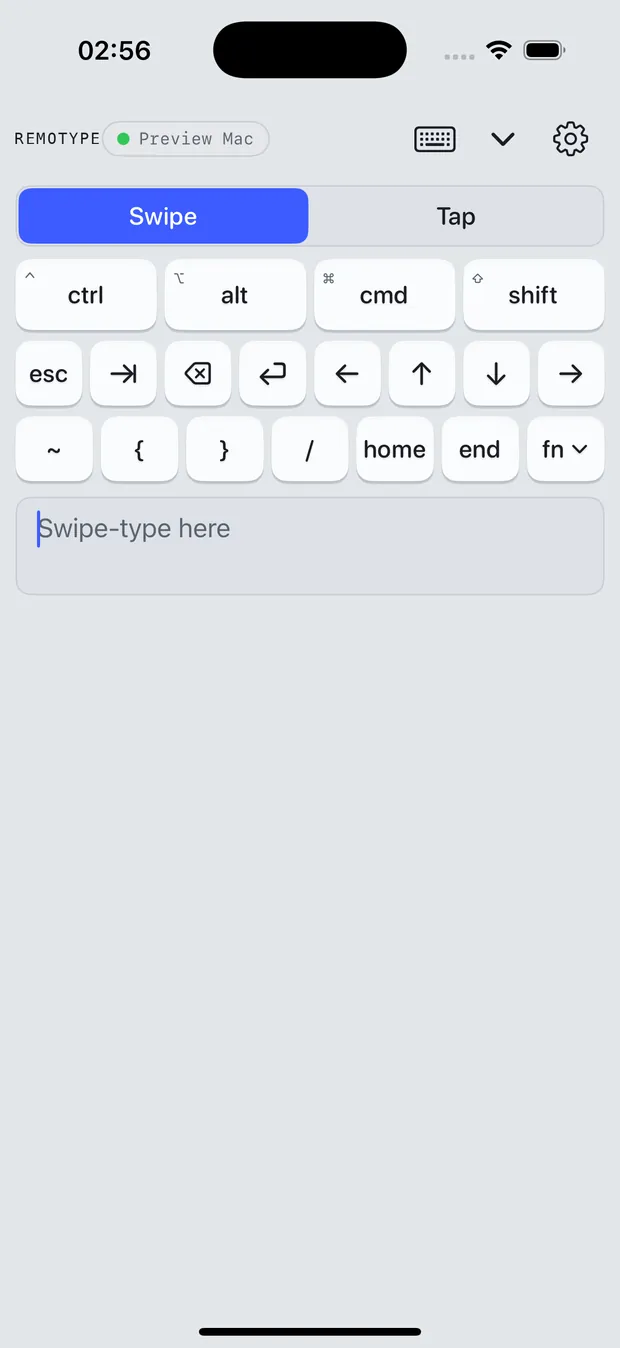
The deck
Modifiers up top, navigation underneath, your own swipe keyboard at the bottom. Keys press down with real travel and spring back — you can feel where you are without looking.
- Hold or quick-tap modifiers for chords
- Esc, Tab, arrows, Home/End in reach
- Swipe-type with autocorrect, one thumb
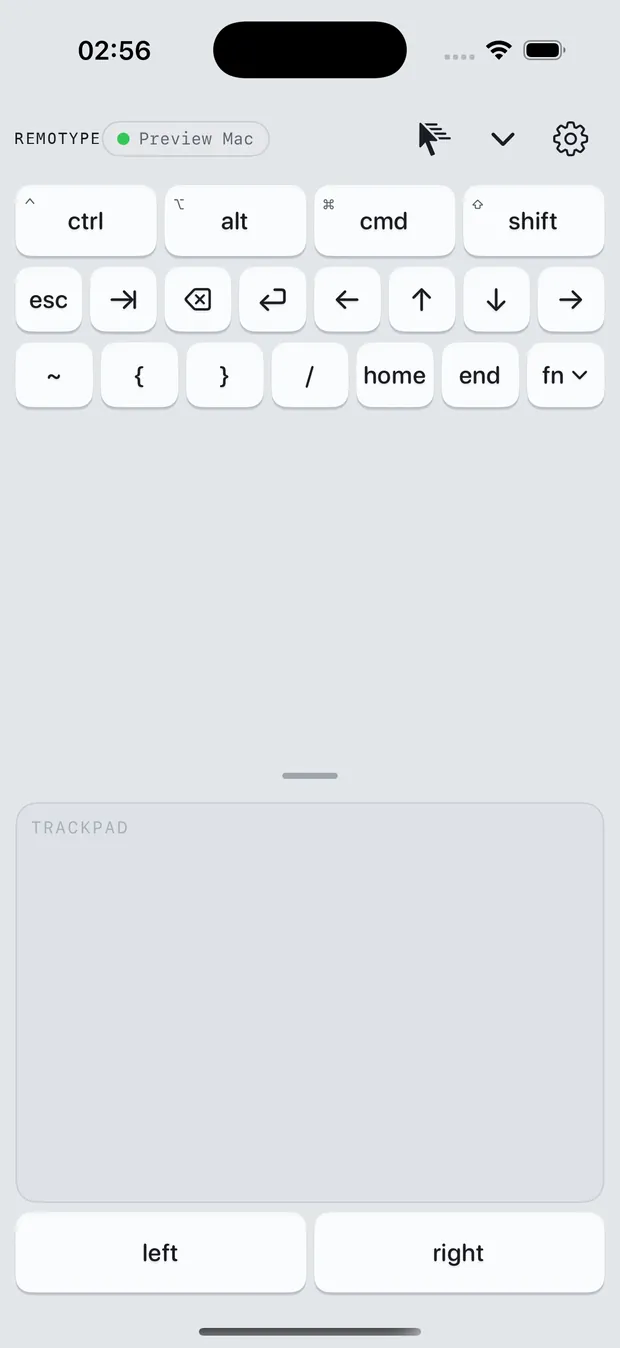
The trackpad
A pad the size of your screen. Tap to click, two fingers to scroll or right-click, pinch to zoom, hold a button to drag — with pointer speed tuned the way you like it.
- Resizable, full multi-touch
- Natural or traditional scrolling
- Keyboard + trackpad split view on Apple hosts
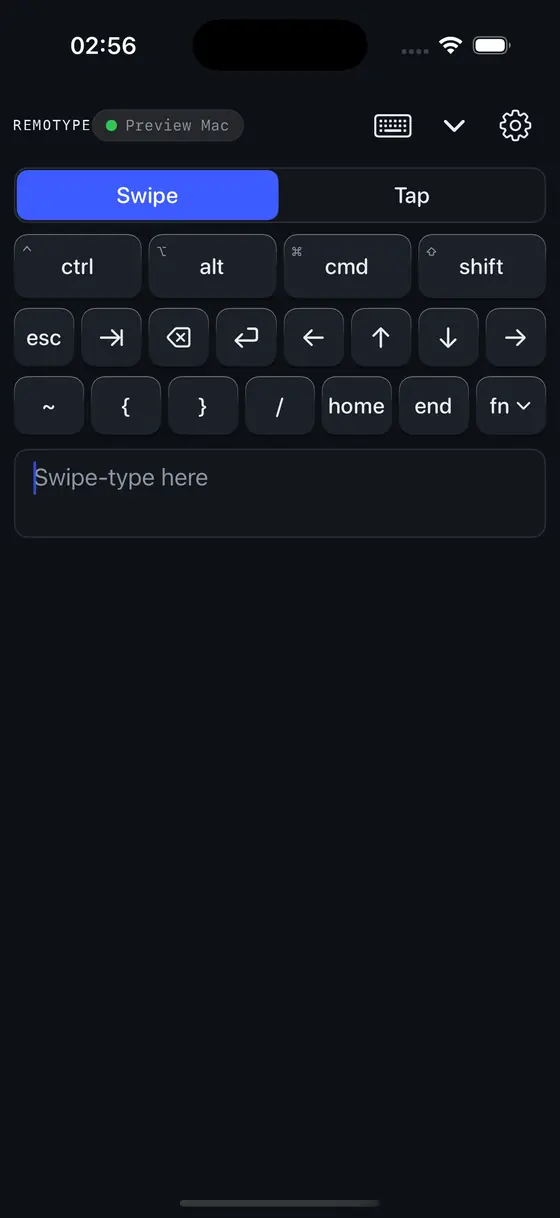
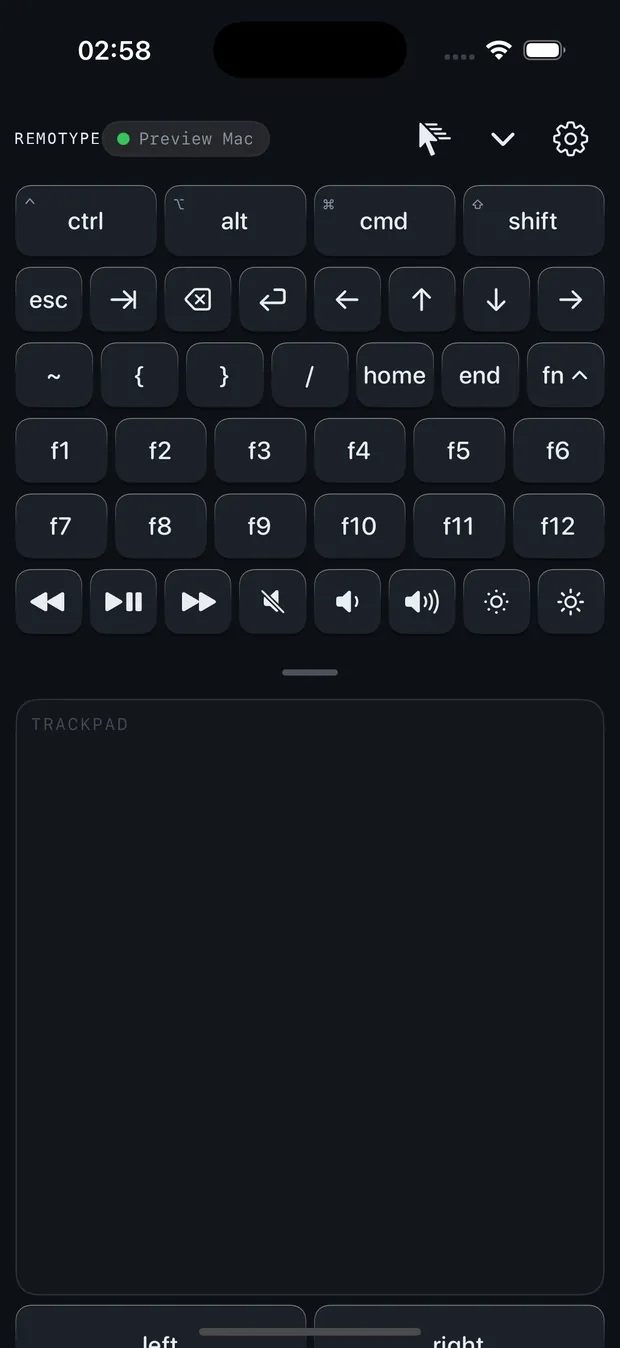
Dark, with everything in reach
A true dark deck for movie-night control, and an Fn drawer that slides out when you need F-keys, volume, brightness or playback — and disappears when you don't.
- Full dark mode, machined edge to edge
- F1–F12 + media keys in the drawer
- Haptics you can switch off
Free & Premium
Keyboard and trackpad, free forever.
The everyday tool costs nothing and always will. Premium adds the power modes, the casting, the remote — pay only if you use them.
14-day free trial — everything unlocked, no card, no account. Then one free hour of Premium, every month.
| Feature | Free$0 · forever | Premiumfrom $5/mo |
|---|---|---|
| Core — free forever | ||
| Wireless keyboardType to your computer over Wi-Fi or Bluetooth | Included | Included |
| TrackpadPointer, tap, scroll and multi-touch gestures | Included | Included |
| Keyboard + trackpad togetherBoth surfaces on one screen | Included | Included |
| Connect over Wi-FiAuto-discovers your computer on the network | Included | Included |
| Connect over BluetoothNothing to install on the computer — pair like a keyboard | Included | Included |
| Themes, accent & hapticsMake it yours | Included | Included |
| Power modes | ||
| NumpadFull number pad for fast data entry | Not included | Included |
| Media & playback controlsPlay, pause, volume, transport | Not included | Included |
| DictationSpeak, and it types — voice to text | Not included | Included |
| MacrosCustom one-tap shortcut tiles | Not included | Included |
| Air mouseTilt the phone to move the pointer | Not included | Included |
| Spotlight & presenter toolsLaser, spotlight and freehand ink on screen | Not included | Included |
| SecretsBiometric vault that auto-types passwords | Not included | Included |
| Screen, TV & casting | ||
| Mirror your computer to the phoneSee and touch your desktop from the couch | Not included | Included |
| TV remoteD-pad, power and text for an Android / Google TV | Not included | Included |
| Cast your screen to a TVSend your computer's display to a Chromecast | Not included | Included |
| Stream your computer's audioRoute the computer's sound to the TV or phone | Not included | Included |
| Sync & remote | ||
| Clipboard syncCopy here, paste there — both directions | Not included | Included |
| Live computer vitalsCPU and memory at a glance | Not included | Included |
| Multi-computer switch + Follow-meHop between computers; carry your clipboard | Not included | Included |
| Connect from anywhereReach your computer over Tailscale / VPN | Not included | Included |
Monthly
$5 /mo
Cancel anytime.
Annual
$40 /yr
Two months free vs monthly.
Lifetime
$240 once
Pay once. Never subscribe.
One purchase covers Android and iPhone. No account, no ads — on any tier. Bought through the App Store and Google Play.
It types your passwords. So it collects nothing.
A keyboard app sees everything you type — which is exactly why Remotype sends keystrokes from your phone to your computer and nowhere else. No analytics, no telemetry, no accounts, no cloud, no ads. The whole policy fits on one page, in plain language.
Read the privacy policyGet Remotype
Put a keyboard in your pocket.
Keyboard and trackpad are free forever, on Android and iPhone — Premium is optional. Store listings are rolling out; until they're live, one email gets you in.
Remotype Host · the free companion
Needed on iPhone & iPad, and unlocks screen-mirror + audio on Android. Tiny, no account, no telemetry — open it on your computer and your phone finds it on the Wi-Fi.
Version 1.0.0 · macOS 12.3+ (signed & notarized) · Windows 10+ · Linux x86-64.